
Glory Casino registration is one short pop-up form. The catch is that two of the choices inside it cannot be undone later: the currency your account runs in, and the bonus type attached to your first deposit.
This page walks a Malaysian player through the form field by field, shows what the header looks like once you are signed in, and covers the account rules behind lockouts. This guide is independent of Glory Casino and is written for adults aged 21 and over; gambling laws differ, so check the rules that apply where you live.
The sign up pop-up asks for three things and a tick. First an Email, then a Password, then a Currency selector, which Malaysian players should set to MYR. Below the fields sits a confirmation box stating that you are 18 or older and accept the User Agreement, and under it the Sign up button. A continue with Google option sits beside the form if you would rather not create another password.
The banner across that pop-up advertises a bonus of up to RM1,300 on a first deposit plus 250 free spins, which is the headline version of the offer rather than the full terms.
Already registered? The same pop-up carries an Already have an account? Sign in line, so you do not need to hunt for a separate login page.
Keep in mind
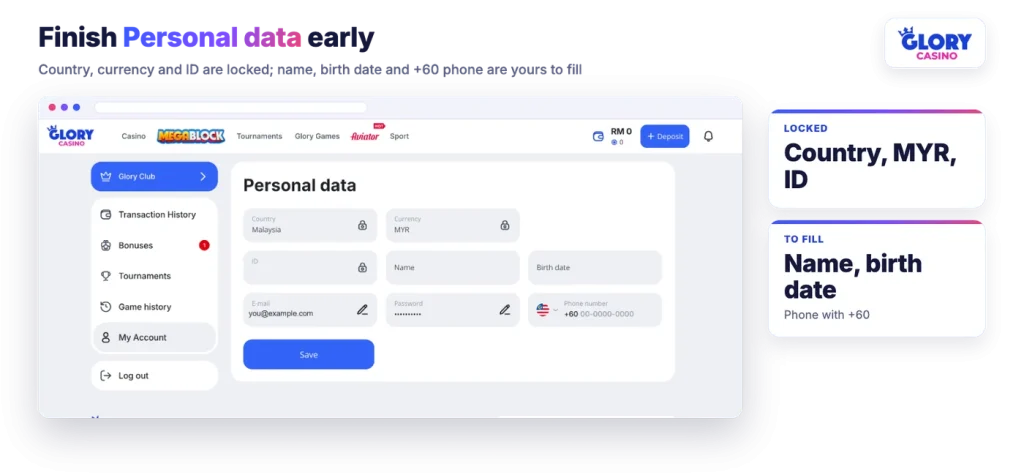
Country and Currency lock once the account exists. Inside Profile, Personal data, both sit alongside your player ID as fields you can read but not edit. There is no in-account route from MYR to another currency, and a second account is not the workaround, because the terms permit one account per person.
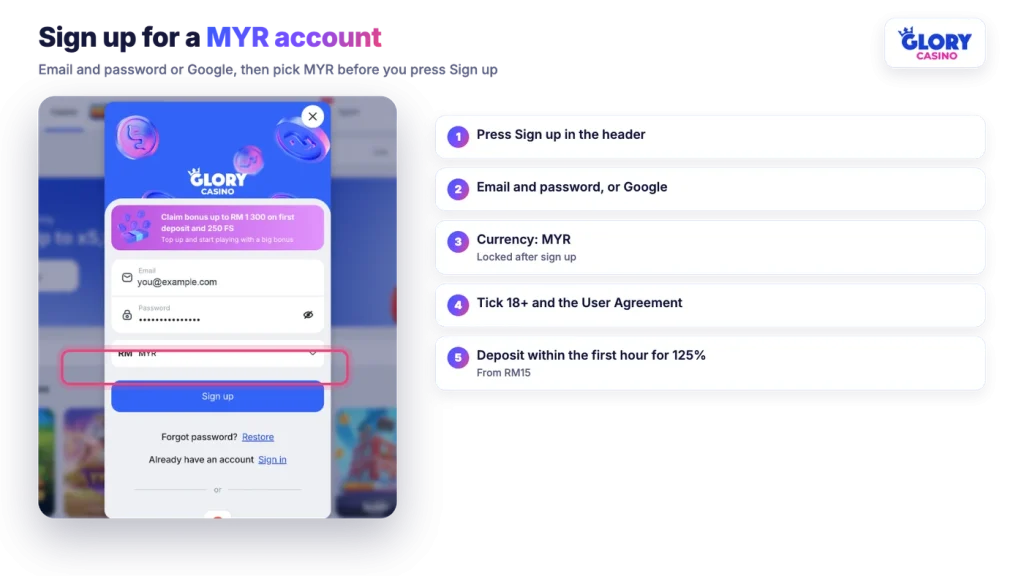
Glory applies 125% to a first deposit of RM15 or more when that deposit lands within one hour of the account being created, and 100% after that window closes. A countdown in Profile, Bonuses shows how much of the hour is left. The mechanics, the RM1,300 cap, the 250 free spins at RM30 and the x35 wagering inside 48 hours all sit in our breakdown of the first-deposit offer.
The second decision is easier to miss. At registration you choose between the casino bonus and the sport bonus, accepting one declines the other, and the choice cannot be changed afterwards. Only the first deposit qualifies, so there is no second attempt.
If you plan to deposit inside that hour, have a funding method ready before you sign up rather than after. The cashier takes Touch ‘n Go and DuitNow deposits from RM10, while FPX starts at RM100, which matters if you were counting on online banking for a small first top-up.
The form, the currency choice and the one-hour clock all sit behind the same button.
On desktop, Sign in sits in the top right of the header. Enter the email and password you registered with, or press the Google button if that is how the account was created. Mixing the two causes avoidable frustration: an account opened through Google does not have a password you have ever set.
The Glory Casino online login works identically in a mobile browser, because it is the same site rather than a stripped-down version. A dedicated Glory Casino login app for Malaysian accounts is not confirmed, so treat any file offered elsewhere with suspicion. What the site does support is installation as a home-screen web app, which opens full screen from your phone’s home screen. As a rule, a web app keeps the same browser session as the tab it was installed from, so you normally land inside your account rather than at the sign in form.
Once you are in, the left menu lists the sections to look at before you fund anything, mapped out in our casino overview. The account menu in the header holds Glory Club, Transaction history, Bonuses, Tournaments, Game history, My Account and Log out.
The sign in form carries a Forgot password? line with a Restore link beside it. That link is the starting point, and it is the only recovery route offered on the form itself.
Password security is the player’s responsibility under the terms, and the operator asks you to notify support if you believe your credentials have leaked. The chat button in the site footer is the route for that. Once you are back inside the account, Password is one of the few editable fields in Profile, Personal data.
Personal data holds a mix of locked and editable fields. Country, Currency and ID are fixed. Name, Birth date, E-mail, Password and Phone number can be filled in, with the phone field expecting the +60 prefix. Press Save when you are done.
Fill these in early rather than at the moment you want your money out. The terms require a real name, date of birth, place of residence and email on file, and the name has to be yours, because withdrawals return to the details used for the deposit. Verification sits in front of the first withdrawal, starting with basic identity details and escalating at higher transaction volumes, and our safety page sets out those steps in order.
One rule sits behind the access problems on this page. The terms allow one account per person, and extend that to one per family, address, email, card number and IP address. A shared home connection or a phone handed round the family can therefore create a duplicate without anyone intending to.
The consequence is specific: a duplicate account can be blocked for up to two months while it is reviewed, and bets placed through it can be cancelled. Bonuses are limited on the same basis, one per person, family, address, device or IP.
So keep one set of credentials, keep them to yourself, and do not create a fresh account to escape a problem with the old one.
| Problem | What to check |
|---|---|
| You picked the wrong currency | The Currency field is locked in Personal data and cannot be switched from MYR to anything else, or back. Raise it with support through the footer chat; do not open a second account, which the terms treat as a duplicate. |
| Email and password are rejected | Confirm the account was not created with Google. If it was, use the Google button instead. Otherwise start with the Restore link beside Forgot password? |
| Account blocked, bets cancelled | This matches the duplicate account rule, where a review can run for up to two months. Contact support through the chat button and do not register again in the meantime. |
| Signed in on your laptop, signed out on your phone | Sessions generally live in the browser they were created in, so signing in again on the second device is normal. If a session ended that you did not close, change the password and tell support. |
| Google sign in will not complete | Make sure you are choosing the same Google account used at registration. A different Google address would create a new account rather than open your existing one. |
| Profile will not save | Check that Name, Birth date and the +60 Phone number are complete, since the locked fields cannot be altered and only the editable ones are submitted. |
None of these are solved by a second registration. The one account rule is the thread running through the whole list, and respecting it keeps both your balance and your bonus eligibility intact.

